
Why Use a Spreadsheet Instead of an App?
Third-party apps run on generic algorithms. A custom spreadsheet bends to your exact visual data parameters. It gives you 100% privacy, requires no subscriptions, and lets you map historical trends without limits. In 2026, manual tracking remains the gold standard for behavioral finance adjustments.
Quick Checklist: Steps to Your First Budget Spreadsheet
If you want to understand how to make a monthly budget on a spreadsheet step by step, you must isolate your actual inputs before coding formulas.
- Gather bank statements: Pull visual data from the last 30 to 60 days.
- Open blank sheet: Launch Google Sheets or Microsoft Excel.
- List Net Income: Write down what hits your bank account after taxes.
- Audit Fixed Expenditures: Pinpoint rent, utilities, and debt dues.
- Track Variable Costs: Measure groceries, entertainment, and fuel.
Setting Up Structural Spreadsheet Parameters
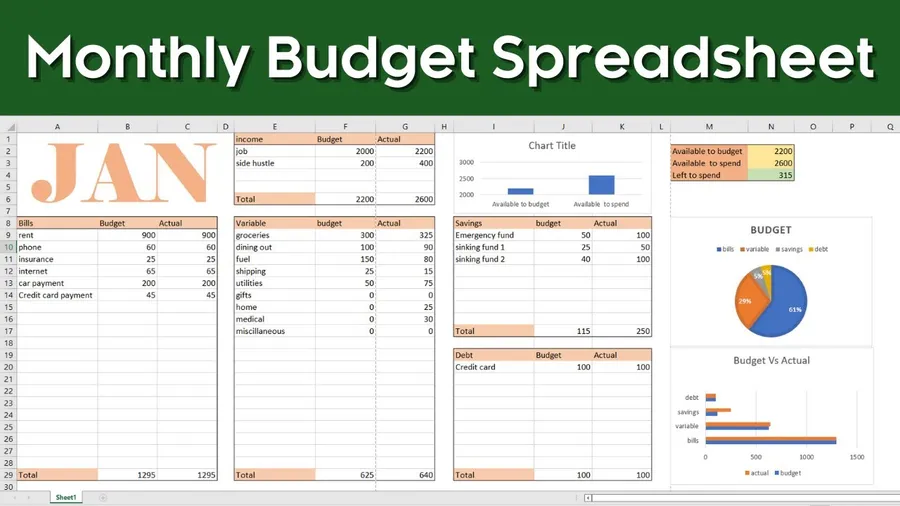
Cluttered sheets break user habits. You want a clean, scannable dashboard. Set up four main columns to prevent horizontal scrolling strain:
- Column A (Category): The visual label (e.g., Groceries, Rent).
- Column B (Projected/Planned): What you intend to spend on day 1.
- Column C (Actual Spend): What you actually spent by day 30.
- Column D (Difference/Variance): Calculating if you are under or over. Compare this variance against investment allocation goals to redirect surpluses.
Grouping Income & Expenditure Matrices
Do not mix your bills. Segmenting helps you understand where to cut fat when inflation pinches your pocket. Ground your numbers against objective cost-of-living inflation metrics.
- The Fixed Vault: Predictable, non-negotiable outflows. Rent, internet, vehicle insurance.
- The Variable Funnel: Fluctuating outflows. Groceries, dining out, weekend travel.
- The Wealth Builder: Sinking funds, emergency buffers, and market deposits. Cross-verify your saving targets using our market beginner guide.
Visual Math Formula Parameters
Let us audit the reading parameters. Below is a standard checklist of the formulas beginners need to type into their cells to trigger automated math.
| Cell Target | Standard Formula | Utility Metric |
|---|---|---|
| Total Expenses | =SUM(C2:C20) | Add up all spending cells |
| Variance Check | =B2-C2 | Planned vs actual check |
| Net Cash Flow | =Income_cell - Total_cell | Final monthly surplus or deficit |
Frequently Asked Questions
What is the best spreadsheet for a monthly budget?
Microsoft Excel and Google Sheets are the best platforms. They are free or accessible, support mobile visual tracking, and offer built-in math functions to automate your calculations.
How do I categorize expenses in a budgeting spreadsheet?
Divide them into Fixed Expenses (rent, insurance), Variable Expenses (groceries, transport), and Financial Goals (saving, investing).
How do I calculate remaining balance on a spreadsheet?
Use the visual formula '=SUM(Income_Cell - Expense_Total_Cell)' to let the software automatically compute your net cash flow.
Conclusion
Learning how to make a monthly budget on a spreadsheet step by step is the ultimate exercise in financial self-awareness. By using clean visual tables, deploying basic sum formulas, and auditing fixed vs variable splits, you can command your money direction in 2026. Audit your bank statements today and spin up your blank sheet.